Wolf Oven Error Codes | What They Mean
You're halfway through dinner prep when the display changes. Instead of the temperature, you see a code. Something like F11. The oven beeps, the heat may shut off, and the recipe is on hold.
Wolf ovens are built to be precise, so when one shows an error code, it's telling you something specific. Some codes are minor and clear after a reset. Others are safety warnings that mean "stop using me."
This guide explains how Wolf oven error codes work, which ones you're most likely to see, and what to do in the first few minutes. One caution up front: codes can differ by model and control version, so use this as a starting point and check your own manual too.
Wolf Cooktop Not Igniting: Common Causes
The First 2 Minutes: Do This
An error code can feel like an emergency. A calm routine helps.
- Write down the code exactly as shown, or take a photo of the display.
- Notice what you were doing. Preheating? Baking? Running a self-clean? Did the lights flicker a moment ago?
- Turn the oven off with the controls.
- Look and smell. If you see smoke, sparks, or flames, or smell burning plastic, leave the oven off. If there's fire, get out and call 911.
- Do one power reset. Turn off the oven's circuit breaker, wait about 60 seconds, then turn it back on.
- Test the oven. If it works normally and the code stays away, it may have been a one-time glitch.
- If the code returns, stop. Don't keep resetting it.
That last step matters. A code that comes back is the oven repeating a warning.
How Wolf Error Codes Work
You'll usually see an F-code on the display, like F1 or F11. Technician service references often list a matching E-code, and some references show the pair together, such as E13/F11.
You don't need to memorize that. Just know that the same problem can appear with two names. When you call for help, give them the exact code you see, plus your model number.
Common Wolf Oven Codes, Grouped by What They Point To
The meaning of a code can vary by model and software version. The groups below show the kinds of problems that are commonly reported. Treat them as clues, not a final diagnosis.
Heat and Temperature Codes (Take These Seriously)
These point to temperature readings or heating that are outside normal limits.
- F2 and F11 (E13 on some references): Often linked to unsafe or too-high oven temperature. A cause may be a temperature sensor, a stuck relay, or a control issue.
- F3 and F4: Often linked to the temperature sensor, such as an open circuit or a sensor that isn't reading right.
- F0 (E12): A temperature reference or sensor problem on some models.
What to do: Turn the oven off and don't use it if the code suggests overheating. A stuck relay can keep heating when it shouldn't. Call a technician. Our guide on what causes an inaccurate oven temperature explains how sensors affect cooking, though that article is about a Viking.
Door and Lock Codes
These come from the door latch, switch, or lock system, which matters most during self-clean.
- F1: Often linked to a door latch or sensor communication problem.
- F7: Often linked to a door switch or interlock fault.
- F9: Often linked to a door lock malfunction.
What to do: Open and close the door firmly, and check for debris around the door seal. Try one power reset. If the oven is locked after a self-clean, wait for it to cool fully before trying anything. If the code returns, a latch, motor, or switch may need replacing.
Fan Codes
- F8: Often linked to a cooling fan error.
What to do: A cooling fan keeps the electronics and the outside of the oven from getting too hot. Listen for odd noises or a fan that doesn't run. If you suspect a fan problem, avoid heavy use until it's checked.
Relay Board and Power Codes
- F12 (E33): Reported as a short circuit on the relay board, sometimes tied to moisture.
- F13 (E35): Reported as a relay board over-temperature after a power interruption while the oven was running.
- Input voltage codes: Some ovens flag low or high incoming voltage.
What to do: If the code followed a power outage or flicker, one reset may clear it. If it returns, stop. If you had just wiped the oven or the control area with a wet cloth or spray, tell the technician. Don't spray cleaner into or near the control panel or vents. Moisture can harm electronics.
Control, Display, and Software Codes
- F5 and others: Some references link these to firmware or software problems.
- Keypad or touch problems: A control that doesn't respond, or shows odd symbols, may point to the control board.
What to do: A reset sometimes clears a software glitch. If the error returns, the board may need testing, reprogramming, or replacement. Don't use the oven if the code could affect temperature control.
Quick Reference: What to Do by Code Type
Heat or temperature code: Stop using the oven. Call a pro.
Door or lock code: Check the door, try one reset, wait for a self-clean to finish and cool, then call a pro if it returns.
Fan code: Limit use. Have it checked.
Power or relay board code: One reset if there was a power flicker. If it comes back, call a pro. Tell them about any moisture.
Software or display code: One reset. If it returns, call a pro.
Things That Can Trigger a Code (That Aren't Real Failures)
- A power surge or outage while the oven was in use
- A door that wasn't fully latched
- Moisture on or near the controls after cleaning
- A loose connection after the oven was moved
- A self-clean cycle that stressed the lock or sensor
- Grease or debris in the door seal or sensor area
If you can link the code to a one-off event, a single reset may be enough. Don't assume that, though, if it returns.
What Not to Do
- Don't keep resetting the oven. Repeated resets can hide a real problem.
- Don't use the oven if the code points to overheating, or if you see smoke or smell burning.
- Don't open the back, top, or control panel. The parts carry high voltage.
- Don't spray liquid on or around the controls.
- Don't ignore a code that appears again and again.
- Don't trust any online chart blindly. Confirm with your own manual or a technician.
What to Tell a Technician
You'll get faster help with these details:
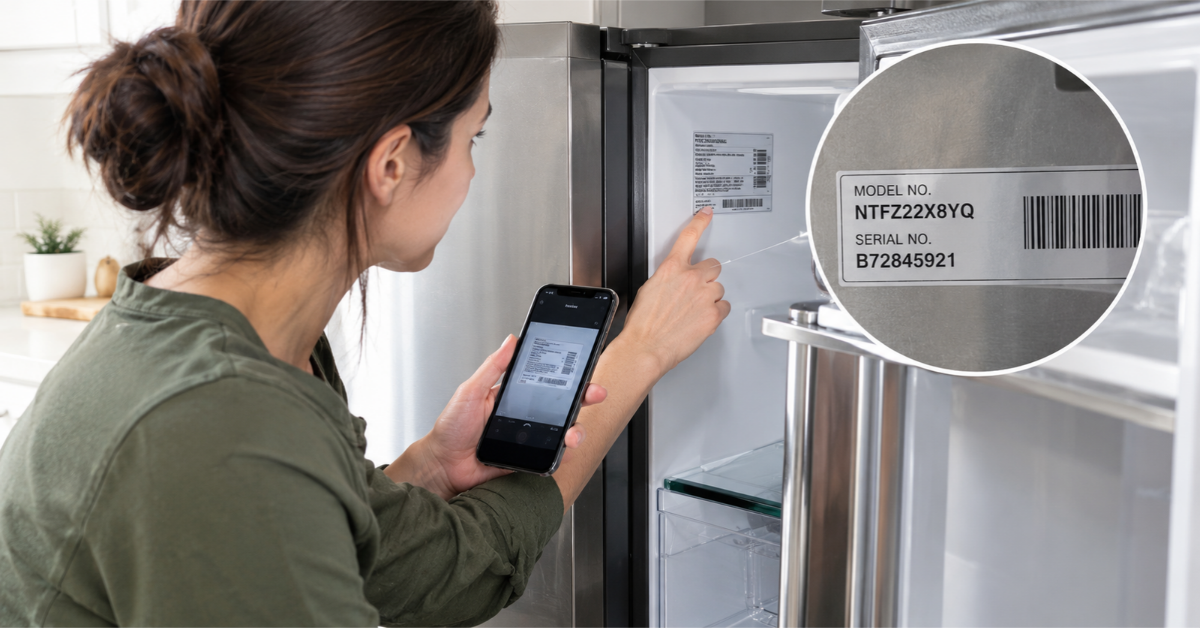
- Your model and serial number. See how to find them
- The exact code, with a photo
- When it appeared, and what you were doing
- Whether it happened after a power flicker, a cleaning, or a move
- Whether a reset helped, and how long it lasted
- Any smells, noises, or smoke
Getting a Reliable Diagnosis
Wolf ovens are premium appliances, and the controls are advanced. A code gives you a clue, but the real cause can be a sensor, a relay, a wire, or the board. Testing the part is better than guessing.
Authorized Appliance is a referral service. We connect you with an appliance repair contractor in your area who works on brands like Wolf. Contractors operate independently. See our Wolf appliance repair page and our oven repair page, or call (833) 220-1666. You can also request a call back or check our Appliance FAQs. Confirm a contractor's licensing and insurance before work begins.
Frequently Asked Questions
Q: What does a Wolf oven error code mean?
A: It's a message from the control system that it has detected a problem, such as a temperature reading, a door lock issue, a fan fault, or a power or control problem.
Q: How do I reset a Wolf oven?
A: Turn off the oven's circuit breaker, wait about 60 seconds, and turn it back on. This can clear a minor glitch, but it won't fix a part that has failed.
Q: Is it safe to use my Wolf oven with an error code showing?
A: It depends on the code. If it may involve overheating, a relay, or a safety lock, don't use the oven until it's checked.
Q: What does F11 mean on a Wolf oven?
A: On many references, F11 (E13) points to a temperature over-limit problem, though meanings can vary by model. Don't use the oven, and have it checked.
Q: Why does my Wolf oven show an error after a power outage?
A: A power interruption during operation can trigger a relay board or control code. If a reset clears it and it doesn't return, it may have been a one-time event.
Q: Why did my Wolf oven error appear after cleaning?
A: Moisture on the controls or relay board can cause a fault. Don't spray liquid on or near the control panel, and tell a technician what happened.
Q: Can I fix a Wolf oven error code myself?
A: You can check the door, power-cycle once, and gather information. Repairs involving sensors, relays, or boards should be done by a qualified technician.
Q: Are Wolf oven repairs worth it?
A: Often yes, since Wolf ovens are high-end appliances. A technician can give you an estimate before you decide.
A Final Note
An error code isn't a mystery to fear. It's a message. Write it down, note what happened, try one reset, and listen to what the oven does next. If the code returns, or it points to heat, don't push your luck. A proper diagnosis protects the oven and your kitchen. Then you can get back to dinner.
You might also like
Educational Center